




(function(w,d,s,l,i){w[l]=w[l]||[];w[l].push({'gtm.start': new Date().getTime(),event:'gtm.js'});var f=d.getElementsByTagName(s)[0], j=d.createElement(s),dl=l!='dataLayer'?'&l='+l:'';j.async=true;j.src= 'https://www.googletagmanager.com/gtm.js?id='+i+dl;f.parentNode.insertBefore(j,f); })(window,document,'script','dataLayer','GTM-WWPJMT6');

Category: Apple

Up your Slide Design Game

How many slides have your students produced – whether it be in Google Slides or Microsoft’s PowerPoint – where there has been little, or no, thought given to the design of the slides? This blog will look at four sites designed to easily solve this problem for you.

Customise the Control Centre on your classroom iPads

There are a lot of great features within your iPad that are often unknown to teachers. These can be organised into your Control Centre for quick access. From locking your students into particular apps to recording the screen, even having text read aloud to you! Find out how you can take control and customise your Control Centre.

Student ICT skills mapping

Students skills and fluency with ICT are just as important as teachers. As students progress through their schooling they are building a certain skill set with using ICT for learning and for life so schools need to consider what this progression looks like and where it is headed. I encourage schools to collaboratively map out students acquisition and mastery of key ICT skills.

Four ways to move beyond substitution with the SAMR model

Classrooms all over the world are now filled with all sorts of amazing technology, but the big question is,’How well is this technology being used?’
Using it for substitution is a great place to begin if you’re new to it, but it should never be a place to stay. This blog looks at four ways to use digital devices beyond the substitution level.

How can we use digital technologies to capture evidence of student thinking?

The idea of digital integration is one that we get asked about a lot! Many teachers are unsure just how they could bring coding, robotics, digital activities or technology in general into their programmes without making it a stand-alone ‘something else’ they have to find time in their day to fit in. This blog will give you three easy ways to get started.

Encourage Students to use spare time purposefully

As learning becomes more self directed and students work collaboratively more often, we tend to have times when some have finished and some haven’t. Rather than letting those finished have ‘free time’ how about designing some form of a choice board with purposeful, engaging activities that develop 21st century Skills.
Here are four ideas you could include.

How to effect change with your colleagues – some tips for effective training.

One of the things I love the most about my job is the opportunity I have to meet with so many dedicated teachers. Our schools have some amazing teachers who are doing fantastic things within their programmes. But like anything, some are more digitally savvy than others. Inspiring the less digitally savvy to join the digital revolution can be challenging. Here’s some ideas to help you effect that change.

3 ways to use your iPads without relying on wifi

Do you have iPads in your classroom but the wifi isn’t always reliable? Instead of ditching them in frustration, read on to find ways you could incorporate them into your classroom practice – without the need for an internet connection.

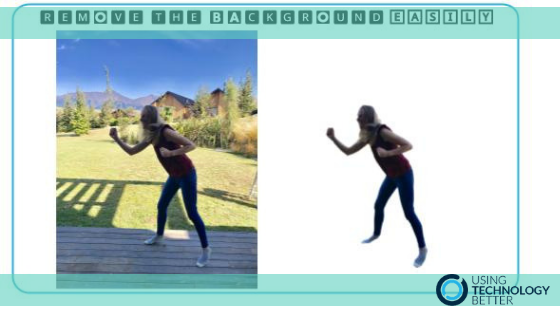
How to easily remove the background of a photo

A question we often get asked is how can the background of a photo be removed to create a png image.
Until recently the answer involved a few steps and sometimes quite a bit of fiddling around. Now – if you are connected to the internet – the answer has become a whole lot easier.

Watch the video below to see how simple the process can now be.

Want to save time? Get to know your keyboard shortcuts

Ever wondered how you could save some time and be more efficient with your workflow? One solution could be to use keyboard shortcuts and save yourself an average of 8 days per year! Yes, 8 days! How was that calculated and what can you do with this information? Read on to find out.

Three Ways To Use The Screen Recording Tool on iPads

Capturing evidence of a student’s learning is vital in order to be able to show how you know, and how they know, they have been successful. I’ll share three different ways you can leverage this tool in your class programme to showcase students’ learning.